NEW documentation: This article covers setup for OWOX BI. For the latest guides on setting up FREE connectors and Data Marts, visit the new OWOX Data Marts documentation.
The query shows exit rate for each step of checkout.
Dynamic parameters
- dataSetName — name of Google BigQuery dataset with Google Analytics sessions data,
- tableName — name of a table with the data,
- startDate — start date of the analyzed period,
- endDate — end date of the analyzed period.
Visualization example
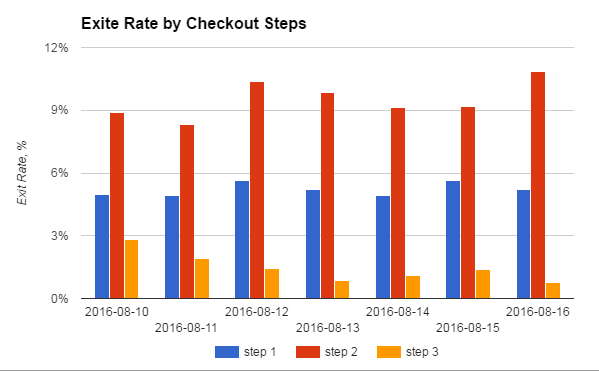
SQL Query
SELECT
  checkoutStep,
  date,
  exitsCount/pageviews AS exitRate
FROM (
  SELECT
    t1.checkoutStep AS checkoutStep,
    t1.date AS date,
    t1.exitsCount AS exitsCount,
    t2.pageviews AS pageviews
  FROM (
    SELECT
      hits.eCommerceAction.step AS checkoutStep,
      date,
      count (hits.eCommerceAction.step) AS exitsCount
    FROM
      TABLE_DATE_RANGE({dataSetName default="OWOXBI_Streaming" type="input"}.{tableName default="session_streaming_" type="input"}, TIMESTAMP('{startDate default="2016-08-10" type="datetime"}'), TIMESTAMP('{endDate default="2016-08-13" type="datetime"}'))
    WHERE
      hits.isExit=1
      AND hits.eCommerceAction.step IS NOT NULL
    GROUP BY
      checkoutStep,
      date) AS t1
  JOIN EACH (
    SELECT
      hits.eCommerceAction.step AS checkoutStep,
      date,
      COUNT(DISTINCT hits.hitId) AS pageviews
    FROM
      TABLE_DATE_RANGE({dataSetName}.{tableName}, TIMESTAMP('{startDate}'), TIMESTAMP('{endDate}'))
    WHERE
      hits.eCommerceAction.step IS NOT NULL
    GROUP BY
      checkoutStep,
      date) AS t2
  ON
    t1.checkoutStep=t2.checkoutStep and t1.date=t2.date
  GROUP BY
    checkoutStep,
    date,
    exitsCount,
    pageviews)
GROUP BY
  checkoutStep,
  date,
  exitRate
0 Comments